 HSE.myUser Guide
HSE.my · PUBLIC USER GUIDE
Compliance & regulatory
Keep obligations, assurance, statutory submissions, audits and controlled evidence ready for review.
Search this category by module, function, role or example scenario.
GOVERNANCE
Compliance & regulatory
Keep obligations, assurance, statutory submissions, audits and controlled evidence ready for review.
01 GOVERNANCEPolicy and ObjectivesVersion, approve, communicate and review OH&S policy and measurable objectives.
What you can do
- Create or amend the record while your role and the current workflow state permit it.
- Capture the controlled particulars: Organization Unit, Title, Description, Version.
- Add source-specific retained details, evidence and location where applicable.
- Submit, review, approve, print or supersede through the controlled workflow.
Authorized role examples
Compliance Manager, Statutory Reporting Officer, Internal Auditor, Management Representative and Organization Administrator. Roles must be active and scoped to the relevant organization unit.
Example scenario
Example: A site needs to version, approve, communicate and review OH&S policy and measurable objectives The authorized user opens Policy and Objectives, completes the controlled record and follows the required workflow.
ANNOTATED CLICK GUIDE
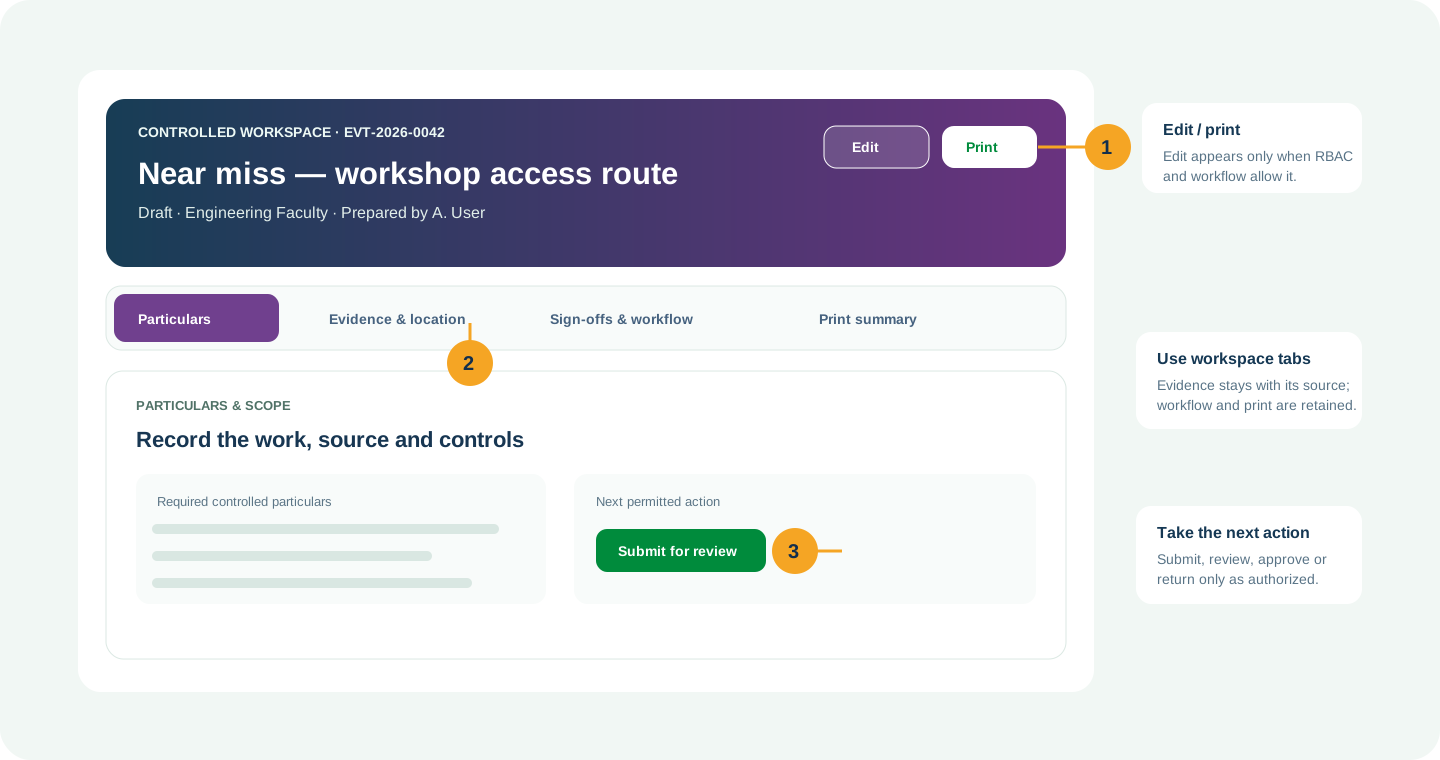
Complete the active tab, then use the highlighted action only when your role and workflow state allow it.


/workspace/governance/policy-objectives- Tap Governance in the bottom navigation, or tap More to open the module picker.
- Use search in the module picker, then select Policy and Objectives.
- On the register, tap Open Workspace for the record or use New only when your role allows it.
Hard delete is never the normal lifecycle for a controlled record. Once used, submitted, approved, linked, printed or evidenced, use amendment, revision, void, retirement, archive or supersede with a reason.
02 GOVERNANCELegal ObligationsMaintain applicable legal duties, owners, evidence, due dates and compliance decisions.
What you can do
- Create or amend the record while your role and the current workflow state permit it.
- Capture the controlled particulars: Organization Unit, Title, Description, Version.
- Add source-specific retained details, evidence and location where applicable.
- Submit, review, approve, print or supersede through the controlled workflow.
Authorized role examples
Compliance Manager, Statutory Reporting Officer, Internal Auditor, Management Representative and Organization Administrator. Roles must be active and scoped to the relevant organization unit.
Example scenario
Example: A site needs to maintain applicable legal duties, owners, evidence, due dates and compliance decisions The authorized user opens Legal Obligations, completes the controlled record and follows the required workflow.
ANNOTATED CLICK GUIDE
Complete the active tab, then use the highlighted action only when your role and workflow state allow it.


/workspace/governance/legal-obligations- Tap Governance in the bottom navigation, or tap More to open the module picker.
- Use search in the module picker, then select Legal Obligations.
- On the register, tap Open Workspace for the record or use New only when your role allows it.
Hard delete is never the normal lifecycle for a controlled record. Once used, submitted, approved, linked, printed or evidenced, use amendment, revision, void, retirement, archive or supersede with a reason.
03 GOVERNANCEISO 45001Maintain clause-to-feature-to-evidence traceability and executable management-system actions.
What you can do
- Create or amend the record while your role and the current workflow state permit it.
- Capture the controlled particulars: Organization Unit, Title, Description, Version.
- Add source-specific retained details, evidence and location where applicable.
- Submit, review, approve, print or supersede through the controlled workflow.
Authorized role examples
Compliance Manager, Statutory Reporting Officer, Internal Auditor, Management Representative and Organization Administrator. Roles must be active and scoped to the relevant organization unit.
Example scenario
Example: A site needs to maintain clause-to-feature-to-evidence traceability and executable management-system actions The authorized user opens ISO 45001, completes the controlled record and follows the required workflow.
ANNOTATED CLICK GUIDE
Complete the active tab, then use the highlighted action only when your role and workflow state allow it.


/workspace/governance/iso45001- Tap Governance in the bottom navigation, or tap More to open the module picker.
- Use search in the module picker, then select ISO 45001.
- On the register, tap Open Workspace for the record or use New only when your role allows it.
Hard delete is never the normal lifecycle for a controlled record. Once used, submitted, approved, linked, printed or evidenced, use amendment, revision, void, retirement, archive or supersede with a reason.
04 GOVERNANCERegulatory Control PacksVersion legally reviewed rules, fields, formulae and official controlled print profiles.
What you can do
- Configure controlled regulatory pack content and applicability.
- Do not use it as an operational case or duplicate evidence source.
- Publish revisions through an authorized configuration workflow.
Authorized role examples
Compliance Manager, Statutory Reporting Officer, Internal Auditor, Management Representative and Organization Administrator. Roles must be active and scoped to the relevant organization unit.
Example scenario
Example: A site needs to version legally reviewed rules, fields, formulae and official controlled print profiles The authorized user opens Regulatory Control Packs, completes the controlled record and follows the required workflow.
ANNOTATED CLICK GUIDE
Complete the active tab, then use the highlighted action only when your role and workflow state allow it.


/workspace/governance/regulatory-control-packs- Tap Governance in the bottom navigation, or tap More to open the module picker.
- Use search in the module picker, then select Regulatory Control Packs.
- On the register, tap Open Workspace for the record or use New only when your role allows it.
Hard delete is never the normal lifecycle for a controlled record. Once used, submitted, approved, linked, printed or evidenced, use amendment, revision, void, retirement, archive or supersede with a reason.
05 GOVERNANCEJKKP 6–10 Statutory ReportingManage JKKP 6, 7, 8, 9 and 10 from one controlled reporting workspace.
What you can do
- Choose JKKP 6, 7, 8, 9 or 10 from the combined statutory workspace.
- Retain submission attempts, delivery proof, authority acknowledgement, correction and print history.
- Use only an authorized statutory reporting officer for submission decisions.
Authorized role examples
Environment/Statutory Reporting Officer and an authorized approver for the organization.
Example scenario
The statutory officer prepares a JKKP submission, retains the delivery evidence and acknowledgement, then prints the complete submission history for audit.
ANNOTATED CLICK GUIDE
Choose the required statutory form, then retain submission evidence and acknowledgement in the controlled workspace.


/workspace/governance/jkkp- Tap Governance in the bottom navigation, or tap More to open the module picker.
- Use search in the module picker, then select Jkkp.
- On the register, tap Open Workspace for the record or use New only when your role allows it.
Submission and ledger history is append-only: correct with a new retained entry, never by overwriting or deleting prior evidence.
06 GOVERNANCERegulator CasesTrack notices, inspections, commitments, submissions, responses and case closure.
What you can do
- Create or amend the record while your role and the current workflow state permit it.
- Capture the controlled particulars: Organization Unit, Title, Description, Authority.
- Add source-specific retained details, evidence and location where applicable.
- Submit, review, approve, print or supersede through the controlled workflow.
Authorized role examples
Compliance Manager, Statutory Reporting Officer, Internal Auditor, Management Representative and Organization Administrator. Roles must be active and scoped to the relevant organization unit.
Example scenario
Example: A site needs to track notices, inspections, commitments, submissions, responses and case closure The authorized user opens Regulator Cases, completes the controlled record and follows the required workflow.
ANNOTATED CLICK GUIDE
Complete the active tab, then use the highlighted action only when your role and workflow state allow it.


/workspace/governance/regulator-cases- Tap Governance in the bottom navigation, or tap More to open the module picker.
- Use search in the module picker, then select Regulator Cases.
- On the register, tap Open Workspace for the record or use New only when your role allows it.
Hard delete is never the normal lifecycle for a controlled record. Once used, submitted, approved, linked, printed or evidenced, use amendment, revision, void, retirement, archive or supersede with a reason.
07 GOVERNANCEWorkplace AssuranceRun configurable workplace assurance checks, accountable findings and effectiveness closure.
What you can do
- Create or amend the record while your role and the current workflow state permit it.
- Capture the controlled particulars: Organization Unit, Title, Description, Assurance template version.
- Add source-specific retained details, evidence and location where applicable.
- Submit, review, approve, print or supersede through the controlled workflow.
Authorized role examples
Compliance Manager, Statutory Reporting Officer, Internal Auditor, Management Representative and Organization Administrator. Roles must be active and scoped to the relevant organization unit.
Example scenario
Example: A site needs to run configurable workplace assurance checks, accountable findings and effectiveness closure The authorized user opens Workplace Assurance, completes the controlled record and follows the required workflow.
ANNOTATED CLICK GUIDE
Complete the active tab, then use the highlighted action only when your role and workflow state allow it.


/workspace/governance/workplace-assurance- Tap Governance in the bottom navigation, or tap More to open the module picker.
- Use search in the module picker, then select Workplace Assurance.
- On the register, tap Open Workspace for the record or use New only when your role allows it.
Hard delete is never the normal lifecycle for a controlled record. Once used, submitted, approved, linked, printed or evidenced, use amendment, revision, void, retirement, archive or supersede with a reason.
08 GOVERNANCEOSHWA AssuranceExecute versioned OSHWA checklist, conditional scoring, CAPA and re-audit verification.
What you can do
- Create or amend the record while your role and the current workflow state permit it.
- Capture the controlled particulars: Organization Unit, Title, Description, Checklist profile version.
- Add source-specific retained details, evidence and location where applicable.
- Submit, review, approve, print or supersede through the controlled workflow.
Authorized role examples
Compliance Manager, Statutory Reporting Officer, Internal Auditor, Management Representative and Organization Administrator. Roles must be active and scoped to the relevant organization unit.
Example scenario
Example: A site needs to execute versioned OSHWA checklist, conditional scoring, CAPA and re-audit verification The authorized user opens OSHWA Assurance, completes the controlled record and follows the required workflow.
ANNOTATED CLICK GUIDE
Complete the active tab, then use the highlighted action only when your role and workflow state allow it.


/workspace/governance/oshwa- Tap Governance in the bottom navigation, or tap More to open the module picker.
- Use search in the module picker, then select OSHWA Assurance.
- On the register, tap Open Workspace for the record or use New only when your role allows it.
Hard delete is never the normal lifecycle for a controlled record. Once used, submitted, approved, linked, printed or evidenced, use amendment, revision, void, retirement, archive or supersede with a reason.
09 GOVERNANCEInternal AuditsPlan risk-based audits, record findings and verify corrective-action closure.
What you can do
- Create or amend the record while your role and the current workflow state permit it.
- Capture the controlled particulars: Organization Unit, Title, Description, Audit program reference.
- Add source-specific retained details, evidence and location where applicable.
- Submit, review, approve, print or supersede through the controlled workflow.
Authorized role examples
Compliance Manager, Statutory Reporting Officer, Internal Auditor, Management Representative and Organization Administrator. Roles must be active and scoped to the relevant organization unit.
Example scenario
Example: A site needs to plan risk-based audits, record findings and verify corrective-action closure The authorized user opens Internal Audits, completes the controlled record and follows the required workflow.
ANNOTATED CLICK GUIDE
Complete the active tab, then use the highlighted action only when your role and workflow state allow it.


/workspace/governance/internal-audits- Tap Governance in the bottom navigation, or tap More to open the module picker.
- Use search in the module picker, then select Internal Audits.
- On the register, tap Open Workspace for the record or use New only when your role allows it.
Hard delete is never the normal lifecycle for a controlled record. Once used, submitted, approved, linked, printed or evidenced, use amendment, revision, void, retirement, archive or supersede with a reason.
10 GOVERNANCERe-auditsVerify corrective actions against an earlier audit using independent evidence.
What you can do
- Create or amend the record while your role and the current workflow state permit it.
- Capture the controlled particulars: Organization Unit, Title, Description, Parent internal audit.
- Add source-specific retained details, evidence and location where applicable.
- Submit, review, approve, print or supersede through the controlled workflow.
Authorized role examples
Compliance Manager, Statutory Reporting Officer, Internal Auditor, Management Representative and Organization Administrator. Roles must be active and scoped to the relevant organization unit.
Example scenario
Example: A site needs to verify corrective actions against an earlier audit using independent evidence The authorized user opens Re-audits, completes the controlled record and follows the required workflow.
ANNOTATED CLICK GUIDE
Complete the active tab, then use the highlighted action only when your role and workflow state allow it.


/workspace/governance/re-audits- Tap Governance in the bottom navigation, or tap More to open the module picker.
- Use search in the module picker, then select Re-audits.
- On the register, tap Open Workspace for the record or use New only when your role allows it.
Hard delete is never the normal lifecycle for a controlled record. Once used, submitted, approved, linked, printed or evidenced, use amendment, revision, void, retirement, archive or supersede with a reason.
11 GOVERNANCEManagement ReviewsExecute agenda, inputs, decisions, resources and improvement actions for management review.
What you can do
- Create or amend the record while your role and the current workflow state permit it.
- Capture the controlled particulars: Organization Unit, Title, Description, Review date.
- Add source-specific retained details, evidence and location where applicable.
- Submit, review, approve, print or supersede through the controlled workflow.
Authorized role examples
Compliance Manager, Statutory Reporting Officer, Internal Auditor, Management Representative and Organization Administrator. Roles must be active and scoped to the relevant organization unit.
Example scenario
Example: A site needs to execute agenda, inputs, decisions, resources and improvement actions for management review The authorized user opens Management Reviews, completes the controlled record and follows the required workflow.
ANNOTATED CLICK GUIDE
Complete the active tab, then use the highlighted action only when your role and workflow state allow it.


/workspace/governance/management-reviews- Tap Governance in the bottom navigation, or tap More to open the module picker.
- Use search in the module picker, then select Management Reviews.
- On the register, tap Open Workspace for the record or use New only when your role allows it.
Hard delete is never the normal lifecycle for a controlled record. Once used, submitted, approved, linked, printed or evidenced, use amendment, revision, void, retirement, archive or supersede with a reason.
12 GOVERNANCEGovernance Evidence PacksAssemble a versioned index of approved policies, audits, actions and assurance evidence.
What you can do
- Assemble an approved, frozen evidence index for review or regulator submission.
- Retain the included reference/version, approval and print history.
- Do not alter an approved pack; supersede it with a new controlled pack when evidence changes.
Authorized role examples
Compliance Manager, Statutory Reporting Officer, Internal Auditor, Management Representative and Organization Administrator. Roles must be active and scoped to the relevant organization unit.
Example scenario
Example: A site needs to assemble a versioned index of approved policies, audits, actions and assurance evidence The authorized user opens Governance Evidence Packs, completes the controlled record and follows the required workflow.
ANNOTATED CLICK GUIDE
Review the included versions, then freeze the evidence index through the controlled approval route.


/workspace/governance/evidence-packs- Tap Governance in the bottom navigation, or tap More to open the module picker.
- Use search in the module picker, then select Governance Evidence Packs.
- On the register, tap Open Workspace for the record or use New only when your role allows it.
Hard delete is never the normal lifecycle for a controlled record. Once used, submitted, approved, linked, printed or evidenced, use amendment, revision, void, retirement, archive or supersede with a reason.
No module or function matches this search. Try a role, module name or action such as “print”, “evidence” or “CAPA”.
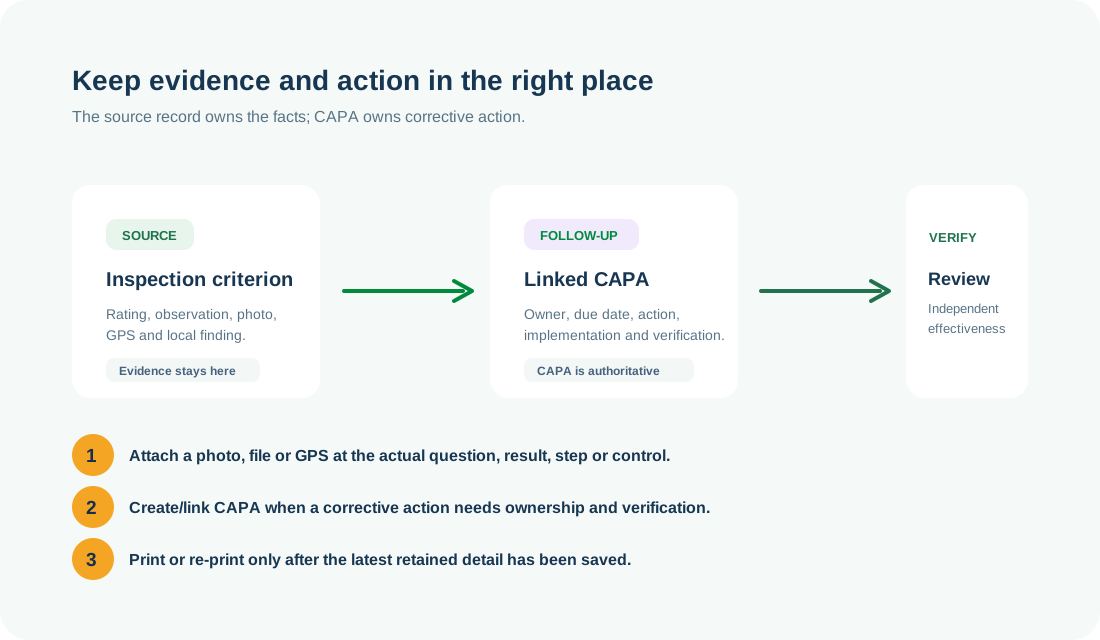
COMMON CONTROL PATTERN
Use the right workspace for the next action
NEED HELP?
Share the record reference, workspace URL and displayed error reference.
Do not include restricted medical, identity or personal data in a support request.